

Signals, if you want them
Buy and sell alerts. Automatic trading is an opt-in Beta, off until you turn it on.
Invest from anywhere. See everything.
See all your accounts in one place: Trading 212, IG and Coinbase, with Interactive Brokers coming soon. Every figure in your own currency, with your UK tax-free allowance tracked live.
Read-only connection available · Encrypted credentials · Cancel anytime
Connects directly to
 Trading 212
 IG
 Coinbase
 Interactive BrokersComing soon
What it does
What you've really made across every broker, how much tax-free allowance is left, and what's moving, without opening four apps.
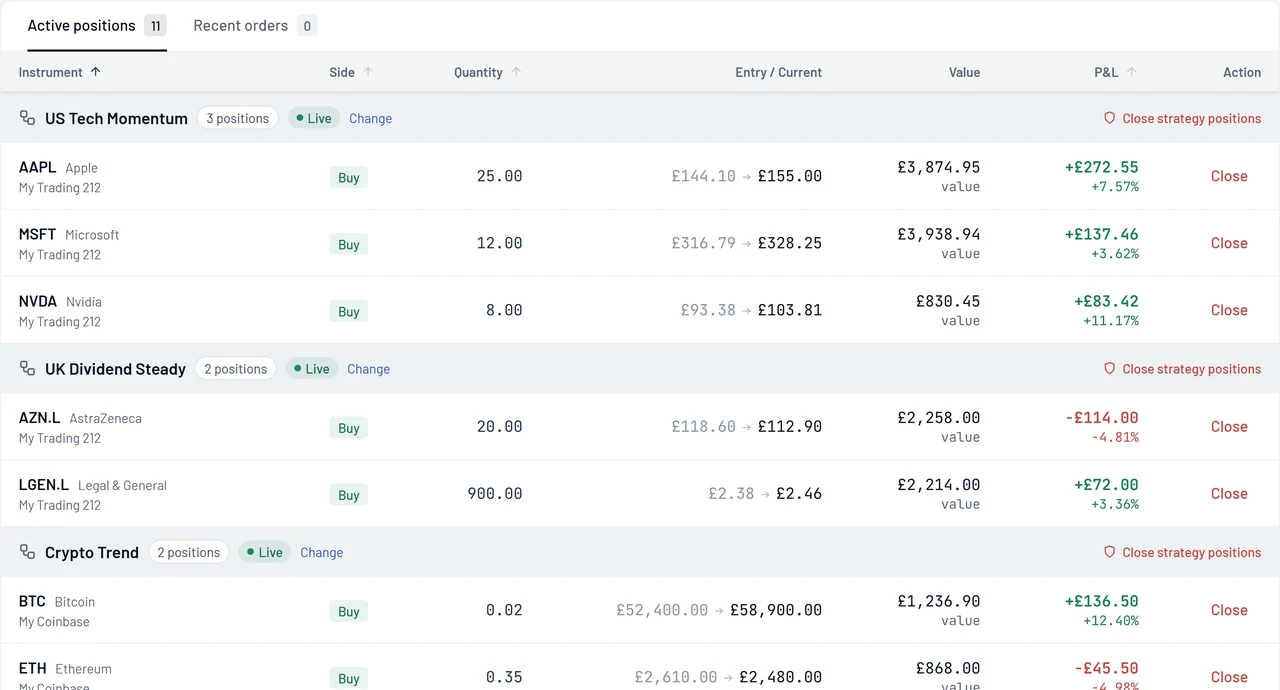
Open trades from every broker in one table, with live profit and loss in your currency. No more adding it up yourself.

Tax allowance
Gains and losses this tax year across every broker, updated on every sale, so you know what's left of your allowance. An estimate, not a tax return.
Allowance left this tax year
£620
of your £3,000 allowance
£2,380 used · estimate
Buy and sell alerts. Automatic trading is an opt-in Beta, off until you turn it on.

Scan stocks, crypto, indices and commodities for setups.

See how a strategy would have done, shown as a £10k portfolio.
Mark the levels you care about and get told when price gets there.
How it works
Link your brokers with an API key or sign-in. Read-only works if you just want to watch.
Your accounts combine into one portfolio, converted to your currency and refreshed through the day.
Place trades, set alerts or try automation. Trading is optional and off by default.
Security
RemoteVest shows your investments and, only if you ask it to, places trades. It never holds your money.
Encrypted credentials
Broker keys and logins are stored encrypted, separately from your account data.
Read-only where your broker allows
Connect with view-only access to see everything without giving trading rights.
We never hold client money
Your cash and investments stay with your broker. RemoteVest cannot make withdrawals.
Two-factor sign-in
Protect your RemoteVest account with an authenticator app.
Open status page
See live status for every broker connection and data feed.
RemoteVest is not a regulated financial adviser. Signals are information, not personal advice.
Connect your first broker in two minutes. Free to start.
No credit card required · 14-day free trial · Cancel anytime